
The HornetQ code base was donated to the Apache ActiveMQ community late last year and now resides as a sub project under the ActiveMQ umbrella named 'Artemis'. Since the code donation, the developers have been working tirelessly to get an initial release of Artemis out the door; to allow folks to give it a whirl and to finalise the donation process. With the release of Apache Artemis 1.0.0, that process has come to a close and the code donation has now been completed.
The active developer community has migrated across to Artemis; all of the developers that were active on HornetQ are now committers to the Artemis project; working on the code base as part of the ActiveMQ umbrella. The hope is that the union of the two great communities HornetQ and ActiveMQ will provide a path for a next generation of message broker with more advanced features, better performance and greater stability. We feel we can achieve these goals using the Artemis core with it's superior performance in combination with the vast feature offering of ActiveMQ. As Aristotle once put it "The whole is greater than the sum of it's parts". Let's hope this holds true for this union and great things will happen.
The Artemis project is targeted to house this next generation of message broker, as such any new feature requests or contributions from the HornetQ community should now be placed into the Artemis stream of development. HornetQ will of course have bugs fixed on its active branches (2.3 and 2.4) but will be mostly in maintenance only mode. For those HornetQ users who are wishing to migrate to Artemis 1.0.0, your job should be easy, Artemis is already compatible with HornetQ clients and supports a number of other protocols such as AMQP, Stomp, ActiveMQ's native messaging protocol 'OpenWire' (at Alpha with support for ActiveMQ JMS clients and basic transport) and also JMS 2. In addition we have already started development on support for MQTT.
To find out more on the Artemis project and how to subscribe to the Artemis mailing lists and get involved, please visit the Artemis website here: http://activemq.apache.org/artemis.
We look forward to seeing you all very soon
Monday, 1 June 2015

Monday, 3 March 2014
HornetQ Vert.x Integration Available
HornetQ now provides Vert.x connector services that can redirect and persist vert.x messages to HornetQ queues and route those messages to a specified vertx address.
Vert.x is a lightweight, high performance application platform for the JVM that's designed for modern mobile, web, and enterprise
applications. Vert.x provides a distributed event bus that allows messages to be sent across vert.x instances and clients.
There are two kinds of Vert.x connector services, an incoming connector service and an outgoing connector service.
An incoming connector service listens to the Vert.x event bus on a configured address for messages and routes them to a configured HornetQ queue. An outgoing connector
service consumes from a configured HornetQ queue and sends/publishes them to Vert.x event bus on a configured address.
The following diagram illustrates how messages flow from the Vert.x event bus to the HornetQ core queue through an incoming connector, and then from the HornetQ core
queue back to Vert.x event bus through an outgoing connector.

1 Configuring a Vertx Incoming Connector Service
Below is an example for a Vert.x incoming connector service:
<connector-service name="vertx-incoming-connector">

  <factory-class>org.hornetq.integration.vertx.VertxIncomingConnectorServiceFactory</factory-class>

  <param key="host" value="127.0.0.1"/>

  <param key="port" value="0"/>

  <param key="queue" value="jms.queue.vertxQueue"/>

  <param key="vertx-address" value="vertx.in.eventaddress"/>

</connector-service>
Shown are the required params for the connector service:
• queue. The name of the HornetQ queue to send message to.
As well as these required parameters there are the following optional parameters:
• host. The host name on which the vertx target container is running. Default is localhost.
• port. The port number to which the target vertx listens. Default is zero.
• quorum-size. The quorum size of the target vertx instance.
• ha-group. The name of the ha-group of target vertx instance. Default is hornetq.
• vertx-address. The vertx address to listen to. default is org.hornetq.
2 Configuring a Vertx Outgoing Connector Service
Below is an example for a Vert.x outgoing connector service:
<connector-service name="vertx-outgoing-connector">

  <factory-class>org.hornetq.integration.vertx.VertxOutgoingConnectorServiceFactory</factory-class>

  <param key="host" value="127.0.0.1"/>

  <param key="port" value="0"/>

  <param key="queue" value="jms.queue.vertxQueue"/>

  <param key="vertx-address" value="vertx.out.eventaddress"/>

   <param key="publish" value="true"/>

</connector-service>
Shown are the required params for the connector service:
• queue. The name of the HornetQ queue to fetch message from.
As well as these required paramaters there are the following optional parameters:
• host. The host name on which the vertx target container is running. Default is localhost.
• port. The port number to which the target vertx listens. Default is zero.
• quorum-size. The quorum size of the target vertx instance.
• ha-group. The name of the ha-group of target vertx instance. Default is hornetq.
• vertx-address. The vertx address to put messages to. default is org.hornetq.
• publish. How messages is sent to vertx event bus. "true" means using publish style. "false"
means using send style. Default is false.
Wednesday, 21 August 2013
HornetQ 2.4.0.beta1 is released and now has JMS2
The HornetQ team is proud to announce the release of 2.4.0.beta1 which can be downloaded here.
This contains a full implementation of the recent JMS 2 specification which includes new features such as simplified API's, Shared consumers on topic subscriptions and Auto Closeable JMS resources.
There are new examples shipped that show this new functionality, these include a jms auto closeable, jms shared consumer, jms completion listener and a jms context example which can be found in the distribution.
There is also a new JEE example demonstrating the use of an injected JMS context which will be runnable against the next Wildfly release.
This version also supports the AMQP protocol for the first time and comes shipped with 2 examples using the Qpid Proton ruby and java clients.
This contains a full implementation of the recent JMS 2 specification which includes new features such as simplified API's, Shared consumers on topic subscriptions and Auto Closeable JMS resources.
There are new examples shipped that show this new functionality, these include a jms auto closeable, jms shared consumer, jms completion listener and a jms context example which can be found in the distribution.
There is also a new JEE example demonstrating the use of an injected JMS context which will be runnable against the next Wildfly release.
This version also supports the AMQP protocol for the first time and comes shipped with 2 examples using the Qpid Proton ruby and java clients.
Thursday, 25 April 2013
HornetQ 2.3.0.Final Released
The HornetQ team is proud to announce the release of HornetQ 2.3.0.Final.
This includes new features such as replication, multiple backups, multiple failover, failback and stomp 1.2 support as well as many other enhancements, fixes and performance tweaks.
Thanks to all the team, Clebert Suconic, Andy Taylor, Francisco Borges, Howard Gao and Justin Bertram as well as Jeff Mesnil for his integration work and all the other contributors.
You can download it from http://www.jboss.org/hornetq/downloads.html
Onwards and upwards to 2.4.
This includes new features such as replication, multiple backups, multiple failover, failback and stomp 1.2 support as well as many other enhancements, fixes and performance tweaks.
Thanks to all the team, Clebert Suconic, Andy Taylor, Francisco Borges, Howard Gao and Justin Bertram as well as Jeff Mesnil for his integration work and all the other contributors.
You can download it from http://www.jboss.org/hornetq/downloads.html
Onwards and upwards to 2.4.
Wednesday, 27 March 2013
HornetQ 2.3.0.CR2 - Pre Final now
This is it! We just release HornetQ 2.3.0.CR2 which we intend to be our last Candidate Release before 2.3.0.Final
We are already in code freeze mode, meaning we are only committing very minor things like release scripts or other minor changes.
This is a big deal for us, we have been working on this release for a while, which mainly includes replication with active sync (meaning you can add a backup to a node and it will copy the live data to the backup side).
Please give it a try, and we will work with anyone who finds an issue before final.
http://www.jboss.org/hornetq/downloads.html
Wednesday, 30 January 2013
HornetQ 2.3.0.CR1
HornetQ 2.3.0.CR1 has just been released
There are several bug fixes on this release and hopefully should be the pre cursor to 2.3.0.Final very shortly.
Replication now seems to be pretty stable, thanks to all who have tested it and help improve it, please let us know your experiences either via the user forum or our IRC channel and we will work hard to get Final out as soon as we can.
Monday, 26 November 2012
HornetQ Beta2 Released
We are really glad to announce our second Beta of HornetQ 2.3.
We are working like crazy to make things happen and we are more than almost there now. We could fix a few issues on replication, and especially the way things are configured. Really thanks for our users who have helped us achieve this release, that's really helpful. On that front I would like to mention Yong Deng who did an awesome job on raising issues about replication on the Beta.
The current schedule is to release HornetQ 2.3 GA early next year. Any input on how things are going for you with replication and failover with 2.3.Beta2 will be really helpful. Our forums are more than ever open for that collaboration.
This could be the latest Beta already. Things are moving along well, and we are really excited about this progress.
http://www.jboss.org/hornetq/downloads.html
Friday, 5 October 2012
HornetQ is literally buzzing - 2.3.0.Beta Released
This is the first Beta which means we are almost at HornetQ 2.3.0.Final.
We have gone through a long refactoring process which included adding support for maven, adding replication and also the capablity of failing back to live servers.
We are in the process of pushing the new version to the JBoss AS7 master branch so look out for it in the next AS7 release or checkout from Github and give it a spin.
HornetQ's is already supported through JBoss Enterprise Application and JBoss SOA Platforms. HornetQ 2.3.0 will be available through EAP6.1, and we are really excited about the progress we are doing.
Any feedback will be warmly welcomed.
HornetQ is buzzing, literally, so enjoy the release, video and the music:
Friday, 13 July 2012
HornetQ 2.3.0 Alpha released
This is not just a simple Alpha Release. It's a big release for us.
- http://www.jboss.org/hornetq/downloads
- http://www.jboss.org/hornetq/docs
We have done a whole refactoring on 2.2.0, where we have introduced atomic failover and lots of enterprise ready improvements, making it part of JBoss EAP and JBoss7. 2011 was a big year for us and we accomplished a lot at the HornetQ hive.
Since last year we have been working, and investing our resources on making replication to happen, and we didn't want just a simple replication working. We wanted replication with FailBack, and also atomic failover.
So, 2.3.0.Alpha is out now, and the only reason we called it Alpha is because it's the first, very first version of replication with failback. It should be very functional already and we would appreciate feedback about its functionality.
So, here are the enhancements we have made on this release.
- The project is now 100% maven based.
We had gone through some major refactoring and reorganization of the source code to make this happen. Maven can be a burden and every maven hater will understand what I mean, but Maven has made us to organize our source code better and make it more modular. This effort is paying off now.
- Separate jar file for the journal.
If you just need a transactional journal, you can use this jar and use just the Journal alone. It's a very fast journal after all.
- Failback and Failover with replication
Failback by itself is a nice innovation on the open source messaging space. That means you can add a server back and the data will be copied over to the new server.
- Cloud discovery support
This version now also includes cloud ready discovery support, based on JGroups 3.0.10, which can work with lots of cloud providers out there.
And of course 2.3 has all the enhancements and fixes we have done on HornetQ 2.2 along the way. So, we are calling 2.3.0.Alpha because replication still under works. But this is a very good achievement for us.
Thanks for the HornetQ team (Francisco Borges, Andy Taylor, Howard Gao, Justin Bertram, Jeff Mesnil and Clebert Suconic) and contributors like Tomohisa on this achievement.
Full speed ahead on 2.3.0.Final now. We should have more releases often this year until we reach Final/GA. Any feedback is always welcome on making HornetQ 2.3.0 ready
- http://www.jboss.org/hornetq/downloads
- http://www.jboss.org/hornetq/docs
We have done a whole refactoring on 2.2.0, where we have introduced atomic failover and lots of enterprise ready improvements, making it part of JBoss EAP and JBoss7. 2011 was a big year for us and we accomplished a lot at the HornetQ hive.
Since last year we have been working, and investing our resources on making replication to happen, and we didn't want just a simple replication working. We wanted replication with FailBack, and also atomic failover.
So, 2.3.0.Alpha is out now, and the only reason we called it Alpha is because it's the first, very first version of replication with failback. It should be very functional already and we would appreciate feedback about its functionality.
So, here are the enhancements we have made on this release.
- The project is now 100% maven based.
We had gone through some major refactoring and reorganization of the source code to make this happen. Maven can be a burden and every maven hater will understand what I mean, but Maven has made us to organize our source code better and make it more modular. This effort is paying off now.
- Separate jar file for the journal.
If you just need a transactional journal, you can use this jar and use just the Journal alone. It's a very fast journal after all.
- Failback and Failover with replication
Failback by itself is a nice innovation on the open source messaging space. That means you can add a server back and the data will be copied over to the new server.
- Cloud discovery support
This version now also includes cloud ready discovery support, based on JGroups 3.0.10, which can work with lots of cloud providers out there.
And of course 2.3 has all the enhancements and fixes we have done on HornetQ 2.2 along the way. So, we are calling 2.3.0.Alpha because replication still under works. But this is a very good achievement for us.
Thanks for the HornetQ team (Francisco Borges, Andy Taylor, Howard Gao, Justin Bertram, Jeff Mesnil and Clebert Suconic) and contributors like Tomohisa on this achievement.
Full speed ahead on 2.3.0.Final now. We should have more releases often this year until we reach Final/GA. Any feedback is always welcome on making HornetQ 2.3.0 ready
Tuesday, 22 May 2012
Running a HornetQ Server with Maven
As part of our ongoing efforts to simplify using HornetQ we decided to Mavenize the HornetQ examples. Part of this process was to write something that would automatically start (and stop) a HornetQ server, we decided that writing a Maven plugin to do this would be the simplest way.
Once I had written it I realised that this may be useful to other people so we have created a maven-hornetq-project in github and released the first version which is available in the JBoss repository.
I'll discuss here how to configure a simple maven example that will start a HornetQ server, run a JMS Client and then stop the server.
The plug info you need to add to your build plugins is as follows
After that there are 3 possible execution goals to choose from:
This Goal basically starts the server, a typical configuration would look as follows:
The Following table explains what each configuration element is used for:
The runClient goal will basically run any standalone java client and is configured like so:
The Important element here is the clientClass, this basically configures which java class you want to run. The Client also supports setting System properties.
NB You can also configure the normal maven java plugin to run as well as an integration test but since it is sometimes difficult in maven to configure the order of executions between different plugins this makes it easier.
The Stop Goal basically does what it says, its stops the HornetQ Server and is configured like so:
It is important here that you configure the stop goal with the same configuration directory as the start goal.
The following dependencies are required to run the HornetQ plugin, the important thing to remember here is that these must be placed in the plugin its self and not the poms main dependencies. Most later versions of HornetQ are supported but I would suggest using the latest and greatest. These would look something like:
One important thing to note here is that the first dependency is needed for the runClient goal and in this case is actually itself, i.e. the group id and artifact id of the same pom.
All the JMS examples currently in the HornetQ master branch at github which you can use as a reference, the snippets in this post come from the JMS queue example.
Once I had written it I realised that this may be useful to other people so we have created a maven-hornetq-project in github and released the first version which is available in the JBoss repository.
I'll discuss here how to configure a simple maven example that will start a HornetQ server, run a JMS Client and then stop the server.
The plug info you need to add to your build plugins is as follows
<plugin>
   <groupId>org.hornetq</groupId>
   <artifactId>hornetq-maven-plugin</artifactId>
   <version>1.0.0</version>
   ..............
After that there are 3 possible execution goals to choose from:
The Start Goal
This Goal basically starts the server, a typical configuration would look as follows:
<execution>
   <id>start</id>
   <goals>
      <goal>start</goal>
   </goals>
   <configuration>
   <fork>false</fork>
   <waitFor>false</waitFor>
   <hornetqConfigurationDir>myConfigurationDir</hornetqConfigurationDir>
   <useJndi>true</useJndi>
   <jndiHost>localhost</jndiHost>
   <jndiPort>1099</jndiPort>
   <jndiRmiPort>1098</jndiRmiPort>
   <systemProperties>
      <property>

         <name>build.directory</name>
         <value>${basedir}/target/</value>
      </property>
   </systemProperties>
   </configuration>
</execution>
The Following table explains what each configuration element is used for:
| name | description | default |
| fork | Whether or not the server is forked in a new process, if false the server will be started in the same vm as the mvn process although it will have its own classloader. If you are running multiple servers or want some isolation then you should set this to true. | false |
| waitFor | Whether or maven should wait until the server has been stopped before returning from the goal, i.e. if set to true maven will just execute the goal and then block. | false |
| hornetqConfigurationDir | Where the server should pick up its configuration files from, i.e. hornetq-configuration.xml | empty |
| useJndi | Whether or not a JNDI server will be started. | true |
| jndiHost | The Host Name that the JNDI server will bind to | localhost |
| jndiPort | The port that the JNDI server will bind too | 1099 |
| jndiRmiPort | The RMI port that the jndi Server will bind too | 1098 |
| systemProperties | Any System properties you want to set before starting the server. useful when using properties in configuration files. | empty |
The runClient Goal
The runClient goal will basically run any standalone java client and is configured like so:
<execution>
   <id>runClient</id>
   <goals>
      <goal>runClient</goal>
   </goals>
   <configuration>
      <clientClass>org.hornetq.jms.example.QueueExample</clientClass>
         <args>
         <param>jnp://localhost:1099</param>
      </args>
   </configuration>
</execution>
The Important element here is the clientClass, this basically configures which java class you want to run. The Client also supports setting System properties.
NB You can also configure the normal maven java plugin to run as well as an integration test but since it is sometimes difficult in maven to configure the order of executions between different plugins this makes it easier.
The Stop Goal
The Stop Goal basically does what it says, its stops the HornetQ Server and is configured like so:
<execution>
   <id>stop</id>
   <goals>
      <goal>stop</goal>
   </goals>
   <configuration>
      <hornetqConfigurationDir></hornetqConfigurationDir>
   </configuration>
</execution>
It is important here that you configure the stop goal with the same configuration directory as the start goal.
Configuring the Dependencies
The following dependencies are required to run the HornetQ plugin, the important thing to remember here is that these must be placed in the plugin its self and not the poms main dependencies. Most later versions of HornetQ are supported but I would suggest using the latest and greatest. These would look something like:
<dependencies>
   <dependency>
     <groupId>org.hornetq.example</groupId>
     <artifactId>hornetq-jms-queue-example</artifactId>
     <version>${project.version}</version>
   </dependency>
   <dependency>
     <groupId>org.hornetq</groupId>
     <artifactId>hornetq-core</artifactId>
     <version>2.2.14.Final</version>
   </dependency>
   <dependency>
     <groupId>org.hornetq</groupId>
     <artifactId>hornetq-jms</artifactId>
     <version>2.2.14.Final</version>
   </dependency>
   <dependency>
     <groupId>org.jboss.netty</groupId>
     <artifactId>netty</artifactId>
     <version>3.2.3.Final</version>
   </dependency>
   <dependency>
     <groupId>org.jboss.javaee</groupId>
     <artifactId>jboss-jms-api</artifactId>
     <version>1.1.0.GA</version>
   </dependency>
   <dependency>
     <groupId>org.jboss.naming</groupId>
     <artifactId>jnpserver</artifactId>
     <version>5.0.3.GA</version>
   </dependency>
</dependencies>
One important thing to note here is that the first dependency is needed for the runClient goal and in this case is actually itself, i.e. the group id and artifact id of the same pom.
All the JMS examples currently in the HornetQ master branch at github which you can use as a reference, the snippets in this post come from the JMS queue example.
Messaging with JMS and MDBs on OpenShift
A suite of Quick starts that have been written to demonstrate the use of Java EE 6 on JBoss AS7 have been written and are available here. As part of this suite we have written an example that uses JMS and MDB's to show how to deploy an MDB and post a message to it via a JMS client. The quick start itself can be found here and the Read me takes you through all the steps needed to do deploy and run the example.
The example also demonstrates how to deploy the example using Openshift. OpenShift is Red Hat's free, Cloud Application Platform as a Service offering which allows application developers and teams to build, test, deploy, and run their applications easily. Pete Muir has created a screencast which takes you step by step through how to do this.
The example also demonstrates how to deploy the example using Openshift. OpenShift is Red Hat's free, Cloud Application Platform as a Service offering which allows application developers and teams to build, test, deploy, and run their applications easily. Pete Muir has created a screencast which takes you step by step through how to do this.
Friday, 20 April 2012
HornetQ 2.2.14 released
HornetQ 2.2.14.Final is the latest community release and contains many fixes and performance enhancements that have gone into both JBoss AS7 and JBoss Enterprise platforms.
You can download it here.
Tuesday, 18 October 2011
Stomp 1.1 Support in HornetQ
HornetQ now supports the Stomp 1.1 protocol and will be available in the next release, for now though it is part of trunk in the SVN repository.
Stomp 1.1 specification is an update to Stomp 1.0 and is backward compatible. New features include protocol negotiation, heartbeat, the NACK frame and virtual hosting.
An example 'stomp 1.1' is also available in the SVN repository which demonstrates a stomp client that uses one of the new features 'protocol negotiation', lets take a look at the example now.
1. Configuring a HornetQ Stomp Server
First of all we need to configure the server to allow stomp connections by adding a stomp acceptor, this is the same as stomp 1.0.
<acceptor name="stomp-acceptor">
<factory-class>org.hornetq.core.remoting.impl.netty.NettyAcceptorFactory</factory-class>
<param key="protocol" value="stomp" />
<param key="port" value="61613" />
</acceptor>
2. Connection Negotiation
Once the HornetQ Stomp server is up and running, it is up to the Stomp client to decide which Stomp specification to use to communicate with HornetQ. This is done by connection negotiation. The Stomp1.1 example shows how to do this
// Step 1. Create a TCP socket to connect to the Stomp port
Socket socket = new Socket("localhost", 61613);

// Step 2. Send a CONNECT frame to connect to the server
String connectFrame = "CONNECT\n" +
"accept-version:1.1\n" +
"host:localhost\n" +
"login:guest\n" +
"passcode:guest\n" +
"request-id:1\n" +
"\n" +
END_OF_FRAME;

sendFrame(socket, connectFrame);
In the above code you can see that the client sends a CONNECT stomp frame with the accept-version set to 1.1, this tells the server that the client is using the 1.1 protocol.
Also new to 1.1 is the host header which is used to configure the virtual host to use, although HornetQ supports setting the header it doesn't support virtual hosts. All other headers are standard Stomp 1.0 headers.
Also new to 1.1 is the host header which is used to configure the virtual host to use, although HornetQ supports setting the header it doesn't support virtual hosts. All other headers are standard Stomp 1.0 headers.
If the server accepts the connection request, it will return a 'CONNECTED' stomp with a 'version' header whose value is 1.1. The example prints this to the console:
...
[java] response: CONNECTED
[java] version:1.1
[java] session:1337300467
[java] server:HornetQ/2.2.5 HornetQ Messaging Engine
[java] response-id:1
...
3. Sending and receiving messages.
Once connected, the client can send and receive Stomp messages with the connection. The example illustrates how to send a stomp message:
// Step 3. Send a SEND frame (a Stomp message) to the
// jms.queue.exampleQueue address with a text body
String text = "Hello World from Stomp 1.1 !";
String message = "SEND\n" +
 "destination:jms.queue.exampleQueue\n" +
 "\n" +
 text +
 END_OF_FRAME;
sendFrame(socket, message);
You can see this is very much the same as a Stomp 1.0 client. The message will be sent to the destination 'jms.queue.exampleQueue'. For the mapping of destination headers to HornetQ jms addresses please refer to the HornetQ's User Manual.
Note: Please pay attention to the leading and trailing spaces in the headers. Stomp 1.0 usually trims off the spaces before processing. But in Stomp 1.1, those spaces are preserved. So in Stomp1.1 unnecessary spaces in headers may result in strange errors which is difficult to find.
4. Enabling Heartbeats
One important feature added to Stomp 1.1 is the heartbeats used to monitor the underlying connection. The heart-beating is established at connection time, using a special header 'heart-beat' in CONNECT frame. For example:
CONNECT
accept-version:1.1
host:127.0.0.1
login:guest
passcode:guest
heart-beat:500,1000
Once connected with the above frame, the HornetQ server will make sure that a stomp frame (or a heartbeat byte) is sent to the client every 1 second (1000 milliseconds). Meanwhile the client should send a stomp frame (or a heartbeat byte) for every 500 milliseconds.
HornetQ server will deem a connection to be broken if it hasn't receive a stomp frame from the client via this connection for a time longer than 2 times of the client heart-beat interval (i.e. 2*500). So for the above case, if it hasn't receive any frame within a second, the server will close the connection.
Note: HornetQ specifies a minimum value for both client and server heart-beat intervals. The minimum interval for both client and server heartbeats is 500 milliseconds. That means if a client sends a CONNECT frame with heartbeat values lower than 500, the server will defaults the value to 500 milliseconds regardless the values of the 'heart-beat' header in the frame.
The HornetQ 1.1 implementation also has several performance improvements however we will continue to improve this over the coming months.
For more information read the stomp specification
Thursday, 1 September 2011
HornetQ on JBoss AS7
Now that JBoss AS 7.0.1 has been released which includes messaging and MDB's I thought we would write a quick tutorial on how to get started deploying JMS resources and MDB's.
We have recently blogged about our achievements on SpecJMS and EAP 5.1.2 and of course the version shipped with AS7 has all the same functionality and performance levels that are available in the EAP platform.
This tutorial will demonstrate how HornetQ is configured on AS7, I Will explain the main concepts of how to configure HornetQ server configuration and JMS resources and also provide an example MDB that we can run. So first of all you will need to download AS7 from here.
Make sure you download the 'everything' version as the web profile does not contain messaging or MDB's by default.
In AS7 there's is a single configuration file, either standalone.xml or domain.xml, which is broken into subsystems. These files are pretty much identical although there are differences however this is beyond the scope of this article. For more information on AS7 and its configuration take a look at the AS7 users guide here.
By default the messaging subsystem isn't enabled however a preview configuration is provided that does contain a messaging subsystem. these are standalone-preview.xml and domain-preview.xml, for this tutorial we will use the standalone-preview.xml. To run the preview configuration simply execute the command from the bin directory:
./standalone.sh --server-config=standalone-preview.xml
You should see the HornetQ server started along with some JMS resources, quick wasn't it. Now lets take a closer look at the messaging configuration itself. Each subsystem has its own domain named that is defined by a schema, the schema for the messaging subsystem can be found in docs/schema/jboss-as-messaging_1_0.xsd in the AS7 distribution.
If you search for jboss:domain:messaging in the standalone-preview.xml you will find the HornetQ subsystem configuration.
If you have used HornetQ standalone or in JBoss 6 you will be familiar with some of the configuration. The first part is basically the same as in the hornetq-configuration.xml file. This looks like:
This is the basic server configuration and the configuration of connectors and acceptors. The only difference here to the standalone HornetQ configuration is that the connectors and acceptors use bindings rather than explicitly defining hosts and ports, these can be found in the socket-binding-group part of the configuration.
For more information on configuring the core server please refer to the HornetQ user manual.
The rest of the subsystem configuration is all JMS resources. firstly you will see some JMS connection factories of which there are two types. Firstly basic HornetQ connection factories:
These are basically normal connection factories that would be looked up via any external client and controlled via HornetQ itself. Secondly you will see pooled connection factories, like so:
These are pooled connection factories and although connect to HornetQ the connections themselves are under the control of the application server. If you have previous experience with older versions of the application server this is the connection factory that would be typically defined in the jms-ds.xml configuration file.
The pooled connection factories also define the incoming connection factory for MDB's, the name of the connection factory refers to the resource adapter name used by the MDB, in previous Jboss application servers this is typically the configuration found in the ra.xml config file that defined the resource adapter.
Lastly you will see some destinations defined like so:
These are your basic JMS Topics and Queues where entry name is their location in JNDI.
Now lets take a simple MDB example build and deploy it and configure the server for it. A sample MDB and client can be found here and uses Maven to build. Download it and run mvn package to build the application ear file.
The example is a simple request/response pattern so before we deploy the MDB we need to configure 2 queues mdbQueue and mdbReplyQueue like so:
now restart (or start) the Application Server and copy the ear file from mdb/mdb-ear/target to the standalone/deployments directory in the AS7 installation. you should now see the mdb deployed. Now we can run the client, simply run the command mvn -Pclient test and the client will send a message and hopefully receive a message in reply.
Congratulations, you have now configured HornetQ and deployed an MDB.
We have recently blogged about our achievements on SpecJMS and EAP 5.1.2 and of course the version shipped with AS7 has all the same functionality and performance levels that are available in the EAP platform.
This tutorial will demonstrate how HornetQ is configured on AS7, I Will explain the main concepts of how to configure HornetQ server configuration and JMS resources and also provide an example MDB that we can run. So first of all you will need to download AS7 from here.
Make sure you download the 'everything' version as the web profile does not contain messaging or MDB's by default.
In AS7 there's is a single configuration file, either standalone.xml or domain.xml, which is broken into subsystems. These files are pretty much identical although there are differences however this is beyond the scope of this article. For more information on AS7 and its configuration take a look at the AS7 users guide here.
By default the messaging subsystem isn't enabled however a preview configuration is provided that does contain a messaging subsystem. these are standalone-preview.xml and domain-preview.xml, for this tutorial we will use the standalone-preview.xml. To run the preview configuration simply execute the command from the bin directory:
./standalone.sh --server-config=standalone-preview.xml
You should see the HornetQ server started along with some JMS resources, quick wasn't it. Now lets take a closer look at the messaging configuration itself. Each subsystem has its own domain named that is defined by a schema, the schema for the messaging subsystem can be found in docs/schema/jboss-as-messaging_1_0.xsd in the AS7 distribution.
If you search for jboss:domain:messaging in the standalone-preview.xml you will find the HornetQ subsystem configuration.
If you have used HornetQ standalone or in JBoss 6 you will be familiar with some of the configuration. The first part is basically the same as in the hornetq-configuration.xml file. This looks like:
<!-- Default journal file size is 10Mb, reduced here to 100k for faster first boot -->
<journal-file-size>102400</journal-file-size>
<journal-min-files>2</journal-min-files>
<journal-type>NIO</journal-type>
<!-- disable messaging persistence -->
<persistence-enabled>false</persistence-enabled>

<connectors>
<netty-connector name="netty" binding="messaging">
<netty-connector name="netty-throughput" binding="messaging-throughput">
   <param key="batch-delay" value="50">
</netty-connector>
<in-vm-connector name="in-vm" id="0">
</in-vm-connector>

<acceptors>
<netty-acceptor name="netty" binding="messaging">
<netty-acceptor name="netty-throughput" binding="messaging-throughput">
   <param key="batch-delay" value="50">
   <param key="direct-deliver" value="false">
</netty-acceptor>
<in-vm-acceptor name="in-vm" id="0">
</in-vm-acceptor>

<security-settings>
<security-setting match="#">
   <permission type="createNonDurableQueue" roles="guest">
   <permission type="deleteNonDurableQueue" roles="guest">
   <permission type="consume" roles="guest">
   <permission type="send" roles="guest">
</permission>
</permission>

<address-settings>
<!--default for catch all-->
<address-setting match="#">
   <dead-letter-address>jms.queue.DLQ</dead-letter-address>
   <expiry-address>jms.queue.ExpiryQueue</expiry-address>
   <redelivery-delay>0</redelivery-delay>
   <max-size-bytes>10485760</max-size-bytes>
   <message-counter-history-day-limit>10</message-counter-history-day-limit>
   <address-full-policy>BLOCK</address-full-policy>
</address-setting>
</address-settings>
This is the basic server configuration and the configuration of connectors and acceptors. The only difference here to the standalone HornetQ configuration is that the connectors and acceptors use bindings rather than explicitly defining hosts and ports, these can be found in the socket-binding-group part of the configuration.
For more information on configuring the core server please refer to the HornetQ user manual.
The rest of the subsystem configuration is all JMS resources. firstly you will see some JMS connection factories of which there are two types. Firstly basic HornetQ connection factories:
<connection-factory name="RemoteConnectionFactory">
<connectors>
   <connector-ref connector-name="netty"/>
</connectors>
<entries>
   <entry name="RemoteConnectionFactory"/>
</entries>
</connection-factory>
These are basically normal connection factories that would be looked up via any external client and controlled via HornetQ itself. Secondly you will see pooled connection factories, like so:
<pooled-connection-factory name="hornetq-ra">
<transaction mode="xa"/>
<connectors>
   <connector-ref connector-name="in-vm"/>
</connectors>
<entries>
   <entry name="java:/JmsXA"/>
</entries>
</pooled-connection-factory>
These are pooled connection factories and although connect to HornetQ the connections themselves are under the control of the application server. If you have previous experience with older versions of the application server this is the connection factory that would be typically defined in the jms-ds.xml configuration file.
The pooled connection factories also define the incoming connection factory for MDB's, the name of the connection factory refers to the resource adapter name used by the MDB, in previous Jboss application servers this is typically the configuration found in the ra.xml config file that defined the resource adapter.
Lastly you will see some destinations defined like so:
<jms-destinations>
 <jms-queue name="testQueue">
    <entry name="queue/test"/>
 </jms-queue>
 <jms-topic name="testTopic">
    <entry name="topic/test"/>
 </jms-topic>
</jms-destinations>
These are your basic JMS Topics and Queues where entry name is their location in JNDI.
Now lets take a simple MDB example build and deploy it and configure the server for it. A sample MDB and client can be found here and uses Maven to build. Download it and run mvn package to build the application ear file.
The example is a simple request/response pattern so before we deploy the MDB we need to configure 2 queues mdbQueue and mdbReplyQueue like so:
<jms-queue name="mdbQueue">
 <entry name="queue/mdbQueue"/>
</jms-queue>
<jms-queue name="mdbReplyQueue">
  <entry name="queue/mdbReplyQueue"/>
</jms-queue>
now restart (or start) the Application Server and copy the ear file from mdb/mdb-ear/target to the standalone/deployments directory in the AS7 installation. you should now see the mdb deployed. Now we can run the client, simply run the command mvn -Pclient test and the client will send a message and hopefully receive a message in reply.
Congratulations, you have now configured HornetQ and deployed an MDB.
Wednesday, 13 July 2011
8.2 million messages / second with SpecJMS
The latest version of HornetQ as part of JBoss EAP 5.1.2 has once again been
benchmarked against SPECjms2007 (c).
HornetQ is also included on JBoss AS7, which contains the same improvements we have made to achieve this performance. You will also be able to get the same performance figures with JBoss AS7.
This latest benchmark has outperformed HornetQ's latest publication by a good margin
already.
With this latest result HornetQ sustained a load of about 8 million messages per
second.
SpecJMS is a peer reviewed benchmark and is the first industry standard and has strict
rules as to how each messaging system is configured. This is to make sure that vendors
don't cheat when it comes to persistence and transactional requirements etc. SPEC is an independent corporation comprised of
representatives from commercial and academic organisations. The corporation creates many
industry standard benchmarks for Java amongst others. The
benchmark simulates how a Message System would be used in a real world scenario.
The
software supports three topologies, Horizontal, Vertical and Freeform. Only Horizontal
and Vertical can be used for publishing a result. Freeform can be useful to create a
custom workload to test the Messaging System for a given usecase.
Horizontal Topology is where the benchmark scales the number of Topic Subscriptions
and Queues whereas a Vertical topology has a fixed number of queues but sends varying
volumes of messages depending on the scale.
* The Horizontal results can be found here
* and the Vertical results here.
The scale is configured by setting the BASE configuration property value. At first
glance the results can look quite confusing but here is a breakdown of the
results:
- What this means in terms of actual performance:
HornetQ sustained a load of about 6 million messages on the vertical topology this can
be seen by looking at the following graph
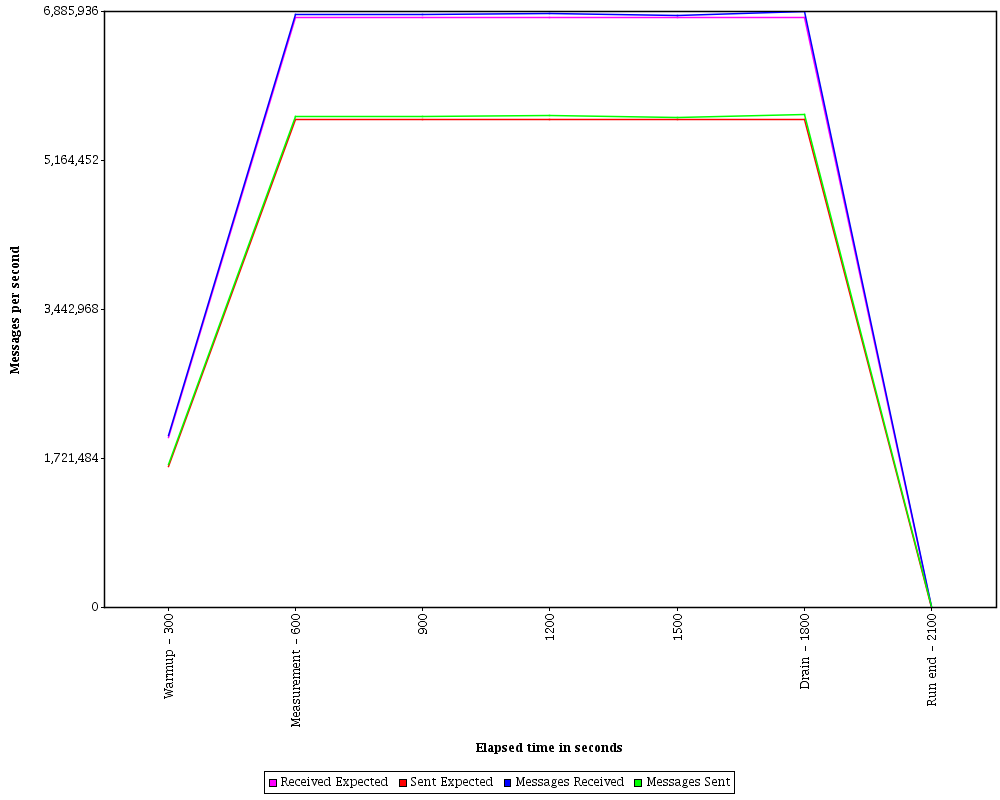

Horizontally HornetQ achieved about 8 million messages per second which is shown on the runtime graph.


The runtime graph is used to show the following:
- The expected versus actual message rates. These provide a quickly check the benchmark driver created enough load for the configured scale.
- The message sent/received spread. You can expect this because topics are used in the benchmark and many clients will receive a single sent message.
- In the Horizontal topology the spread will be greater than Vertical. Horizontal topology by it's nature has a greater distribution of messaging clients.
The system configuration diagram shows the hardware installation used for this result and necessary to
get similar levels of performance.
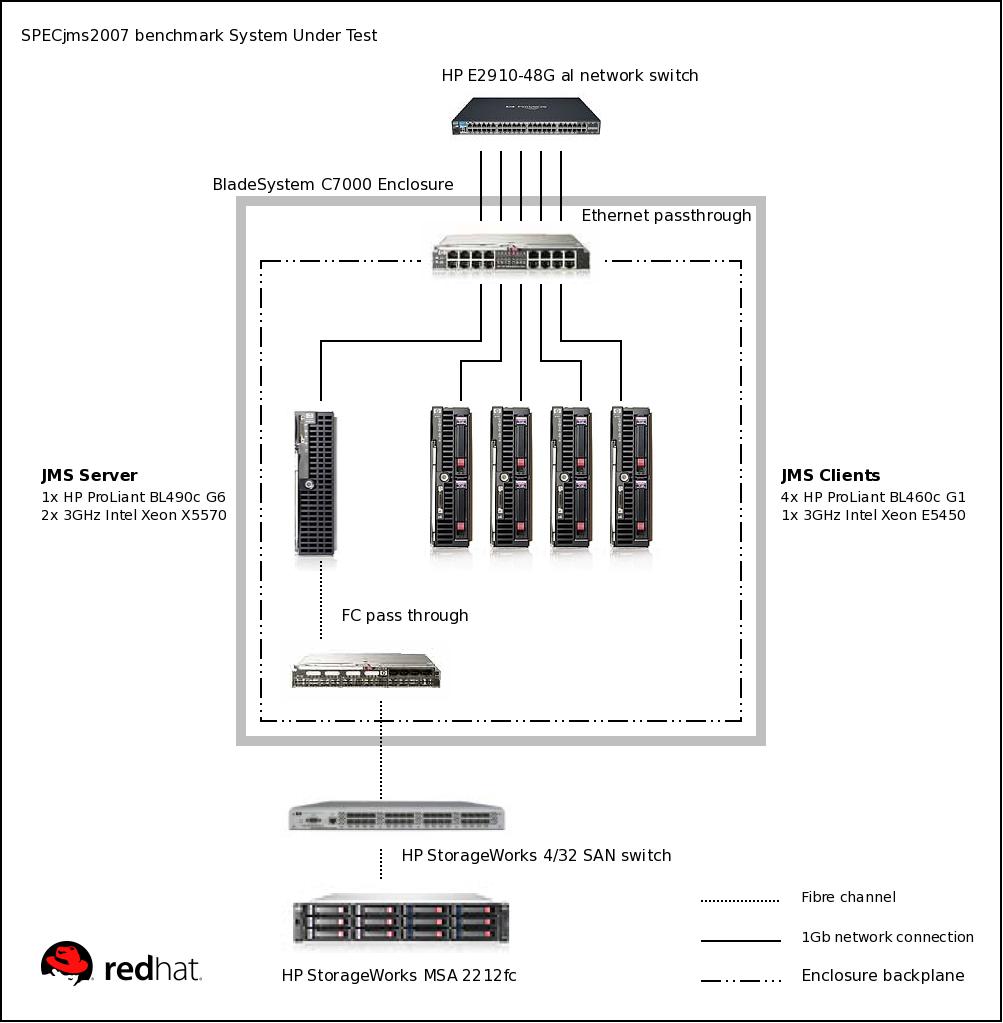

The server was a 2 chip 4 core CPU with 24576 MB of memory and a 1 GbE network
interface. The client's, of which there were 4, were 1 chip 4 core CPU with 22528 MB of
memory and also a 1 GbE network interface. The HornetQ journal is persisted using a
networked mass storage array available to the messaging server.
A few options were set on the JVM which were as follows:
- -XX:+UseLargePages - this enables large pages
- -XX:LargePageSizeInBytes - set the large page size
- -Xms and -Xmx - setting these both to 3800m stops any memory resizing delays
The following changes were made to the HornetQ Server configuration which were as
follows
- configuration.journal-min-files - this was set to a large number of files
- configuration.thread-pool-max-size - increased level of concurrency
For more detailed information about the benchmark see the DesignDocument
provided by SPEC. Additionally there is an academic paper detailing the workload characterization in greater detail.
Friday, 17 June 2011
HornetQ 2.2.5 released
HornetQ 2.2.5.Final will be the first HornetQ release included in the long awaited JBoss AS7. It also contains fixes for paging performance, journal compacting and message priorities amongst others.
Thursday, 5 May 2011
HornetQ is rocking out this week
Since I started working on HornetQ, this was the best week ever.
First the presentation on Judcon had a full room. Even though I suck (at least I think) on presenting, HornetQ shined out by itself as I was showing the new features and the work we have done.
Paging has a new model, more performant and non-blocking. On HornetQ 2.2.2 the syncs on paging are also batched through timers, what really improves performance on page mode also.
The atomic and transparent failover is really enterprise level.
And a lot of cool stuff!
Regarding paging, Drew Dahlke wrote a nice blog entry about how performant is paging on HornetQ on paging:
http://drewdahlke.blogspot.com/2011/05/benchmarking-hornetq-222-paging-mode.html
Wednesday, 30 March 2011
HornetQ 2.2 Super-HornetQ
This is the best HornetQ release ever. HornetQ was already cutting edge but is now even better.
It is available here with docs here
This latest release contains the following improvements in functionality
- HornetQ Rest
Thanks to Bill Burke, we have a brand new and cool rest interface that's being released with 2.2.2. Look for a Judcon presentation just about this topic
- New improved failover.
Failover now support multiple backups for live servers and also allows automatic fail back to the original live server.
It also supports using shared file systems for shared journal using distributed locks to handle failover. We also guarantee that the backup server will stay completely passive until the main server crashes avoiding split brain occurring.
- New paging model
The new model now won't lock the address if you have a lazy consumer on a core-queue (or on the Topic Subscription in JMS terms) which previously caused consumer starvation. The system will navigate through page files like a cursor, keeping a soft-cache in memory to avoid duplicated references.
- Large Message Compression
It is now possible to compress the message body of large messages.
On the maintenance front thanks to the JBoss QA guys, their thorough testing means we are more confident then ever of delivering a well tested stable piece of software.
>other improvements include:
- Improvements on the journal reliability.
- Clustering reliability
- XA Integration
On the performance front we have made some optimizations:
- Optimized some non necessary syncs we were doing on the journal
- Optimized syncs on paging. Paging is now also scaling up syncs when many producers are syncing messages.
Also: HornetQ should be available for EAP users really soon, being a viable alternative for enterprise users who require a supportable alternative.
Many thanks for our contributors and for our QA department.
Friday, 8 October 2010
Announcement: Stepping down as project lead
As of today I'll be stepping down as project lead for the HornetQ project.
This has been a really hard decision for me to make, after all, HornetQ is my baby, and I've invested a lot of mental as well as emotional effort in getting it to where it is today.
The last four years have been really tough. Creating a world class messaging system with a tiny team is a formidable job. But getting this far has taken it's toll on me, and I need to step aside and take a rest for a while.
So what am I going to do next? Not really sure yet, but I'll be taking it easy on sabbatical from Red Hat until the beginning of next year when things should be more clear.
Where does HornetQ go from here? The future is bright for HornetQ. It's the default messaging provider in JBoss AS 6 and 7, and will shortly be available supported in JBoss EAP.
I truly believe HornetQ has the potential to be the world's #1 messaging system. We already know it has the best performance, and now we're rounding off the last few features so we can really position ourselves as a true enterprise class messaging system to go against, and win against any system in the market.
The future is bright :)
This brings me to....
I'd also like to announce that Clebert Suconic will be taking over my role as HornetQ project lead :)
Congratulations Clebert!
Clebert is a nice guy and a talented engineer and knows HornetQ back to front having worked on it from the beginning. HornetQ can't be in better hands than Clebert's.
So, I bid you farewell, and happy messaging!
Tim Fox
=======
Friday, 3 September 2010
HornetQ - the Performance Leader in Enterprise Messaging
We have just published a report that compares the throughput performance of the majority of the enterprise messaging market, and HornetQ comes out as #1 :)
In fact, in several uses cases we pretty much destroy the competition.
Read the full report
Subscribe to:
Posts (Atom)